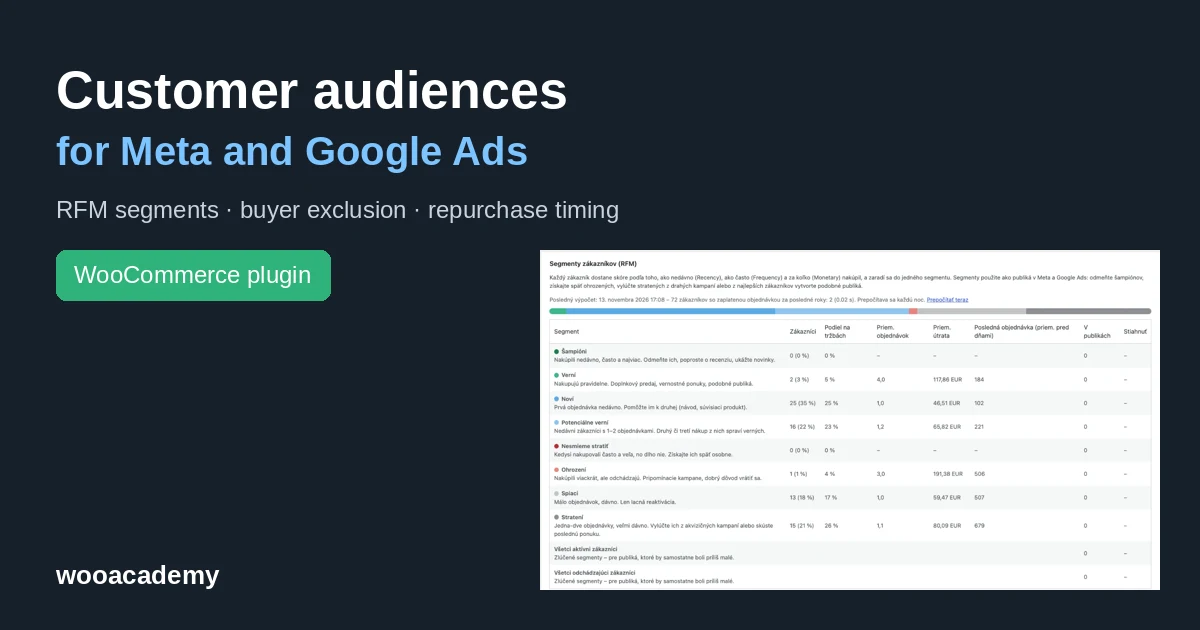



In short: the wooacademy catalog feed plugin sorts your WooCommerce customers every night by when, how often and how much they bought. It turns the result into audiences for Meta (Facebook, Instagram) and Google Ads. You stop paying to advertise to people who already bought, you reach customers when they are about to run out, and you build lookalikes from your best customers instead of everyone. Only customers with a legal basis are sent, and only as hashes.
Big platforms such as Bloomreach and Klaviyo sell this as part of much larger packages. In the plugin it costs €99 a year and the data stays on your server. Below: how it works, which permissions you need, whether your ad account can get restricted, and a step-by-step setup with screenshots.
What the plugin does
Once a night it runs one background database query over paid orders (the last 1 to 5 years, 2 by default). Every customer gets three scores:
- R (Recency) – how long ago they last bought,
- F (Frequency) – how many orders they have,
- M (Monetary) – how much they spent after refunds, per currency.
The combination puts them into one of eight segments. Since version 1.7.0 the plugin also builds two behavioural audiences that sit on top of the segments, so a customer can be a champion and due for a repurchase at the same time.
| Audience | Who is in it | What to do in campaigns |
|---|---|---|
| Champions | bought recently, often and the most | new products, review requests, lookalike seed |
| Loyal | buy regularly | cross-sell, loyalty offers |
| New | first order recently | help them to a second order with a related product |
| Promising | recent customers with 1 or 2 orders | a second or third purchase makes them loyal |
| Can’t lose them | used to buy often and a lot, not for a long time | a personal win-back offer |
| At risk | several orders, but slipping away | a reminder with a reason to come back |
| Hibernating | few orders, long ago | cheap reactivation only |
| Lost | 1 or 2 orders, very long ago | exclude from expensive campaigns |
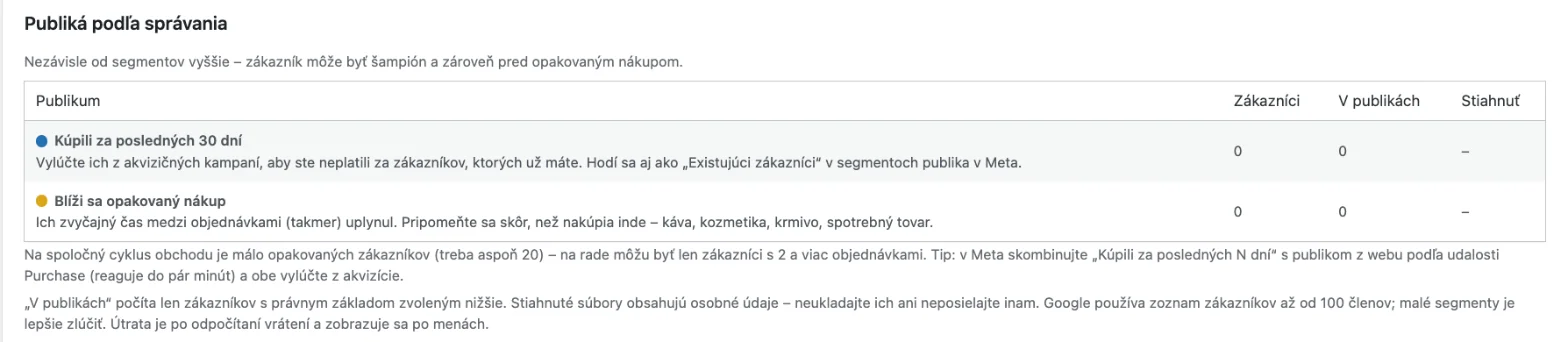
| Bought in the last N days (new) | last order within 7 to 90 days (30 by default) | exclude from prospecting, existing customers in Meta |
| Repurchase due (new) | their usual time between orders has (almost) passed | remind them before they buy elsewhere |
Two merged audiences, All active customers and All lapsed customers, help smaller shops, where single segments are often under 100 people and Google will not use a smaller list.
How repurchase timing works
A customer with two or more orders has their own cycle, the average number of days between orders. Four orders in 63 days means a 21-day cycle. They are due when 0.8 to 1.5 times the cycle has passed since the last order, in this example 17 to 32 days. Split orders on the same day do not count; the gap must be at least 7 days.
One-order customers can use the shop-wide median if the shop has at least 20 repeat customers. That makes sense for coffee, cosmetics or pet food. Turn it off for mattresses, furniture or cars, where nobody buys again next month.
Why it helps your campaigns
You know pixel retargeting. Customer audiences do something different: they give the ad algorithms information the pixel does not have.
- You stop paying twice for the same customer. A prospecting campaign without buyer exclusion spends part of the budget on people who would have bought anyway. It shows most with expensive one-off purchases.
- Meta knows who your existing customers are. Audience segments in the ad account settings then split results into new and existing customers, so you see how much budget actually brought new people.
- Lookalikes from the right people. A lookalike built from champions looks for people like your best customers, not like everyone who once bought a sample. The plugin’s Meta CSV includes customer value, so you can build a value-based lookalike from it.
- Timing. The pixel does not know a customer runs out of coffee next week. The repurchase audience knows it from the orders.
- Customers the pixel cannot see. People who refused cookies, switched devices or bought a year ago are in the audience if they gave consent at checkout.
To be fair about the limits: with a few hundred customers, segments will be small and the effect modest. Use the merged audiences then; buyer exclusion brings the most. Good conversion tracking still comes first. If Meta does not receive purchases through the Conversions API, no audience will make up for it.
Permissions, consent and GDPR
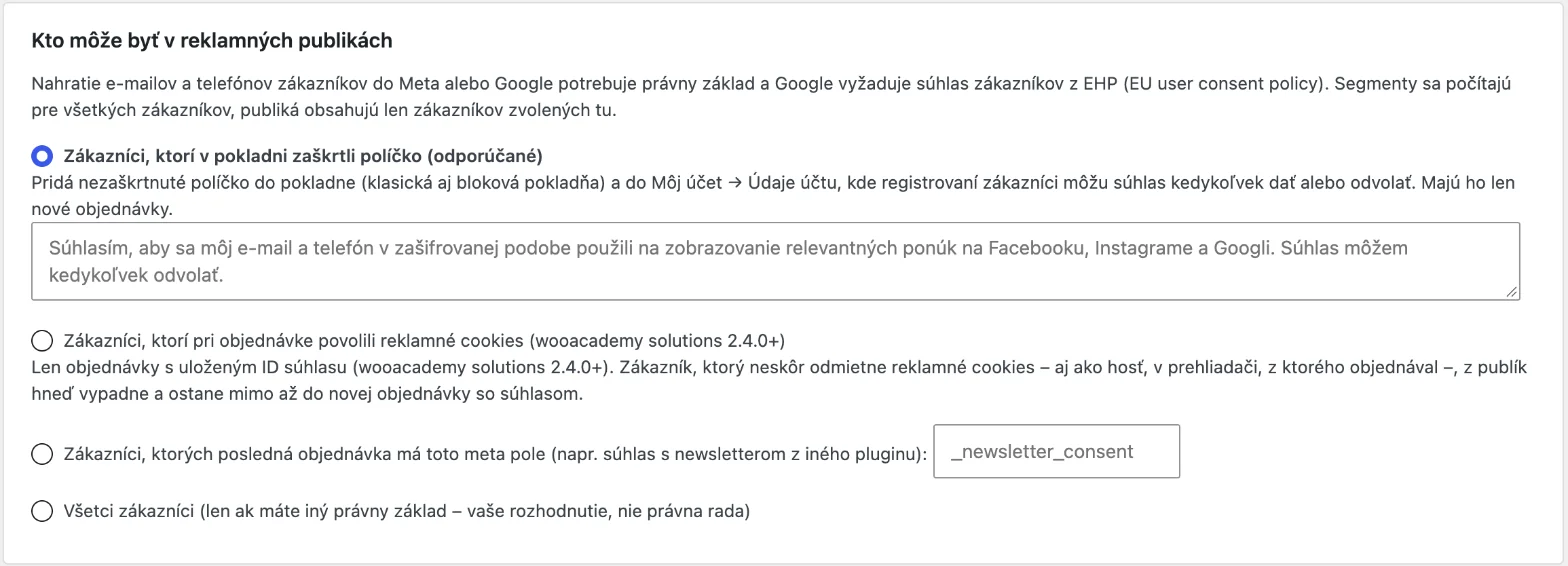
Uploading customer e-mails and phone numbers to Meta or Google is processing of personal data. Both platforms require a legal basis, and for users in the EEA Google requires consent under its Customer Match policy. That is why the plugin calculates segments for everyone but only lets the customers you choose into audiences:
- Checkout checkbox (recommended). An unticked checkbox in the classic and block checkout and in My account, where registered customers can withdraw it at any time. Applies to new orders.
- Advertising cookies at the time of the order. With the wooacademy solutions cookie banner 2.4.0 or later, the plugin knows the consent stored with the order. Anyone who later refuses advertising cookies, guests included, leaves the selection at once and the Meta audience at the next sync.
- A custom order field, for example newsletter consent from another plugin.
- All customers – only if you have another legal basis. Your decision, not legal advice.
What the plugin handles for you:
- e-mail, phone and names go to Meta and Google hashed with SHA-256; country and postcode stay readable, as Google requires,
- withdrawn consent or an erasure request removes the customer from audiences at the next sync,
- WordPress personal data export and erasure include the segments,
- uninstalling deletes the segments and credentials.
Add to your privacy policy that you use customer data in hashed form to show ads on Meta and Google. Have a lawyer check the exact wording.
Can your ad account get restricted?
For a normal shop uploading its own customers with consent, no. The risk comes from breaking the rules, so know them.
Meta
- With your first customer list audience you accept the Custom Audience terms. You confirm that you have the right to use the data and that people who opted out are not on the list. Bought, scraped or non-consented lists are exactly what gets accounts restricted.
- Special ad categories (housing, employment, financial products) have stricter customer list rules since 2025; Jon Loomer explains them well. They do not affect a typical shop.
- Shops that Meta classifies as health and wellness have had limited conversion events and audiences since 2025. If you sell supplements or medical supplies, check in Events Manager that audiences work for you before you rely on them.
Google Ads
- Customer Match is available to accounts with a good history of policy compliance and payments. Every such account can use audience exclusion and observation.
- Targeting a list directly and manual bid adjustments require at least 90 days of history and more than USD 50,000 lifetime spend. Smaller shops will mainly use lists for exclusion and observation.
- A list needs at least 100 active members to be used.
- Google can remove Customer Match access for violations and suspend the account for serious or repeated ones.
How the plugin lowers the risk
- Only customers with the chosen legal basis go into audiences.
- Meta gets a system user token with ads_management only. The plugin never changes campaigns, budgets or account settings; it only creates and updates audiences.
- If a calculation fails, Google gets a try-later response, not an empty list that would replace the good one.
- An audience you untick is emptied in Meta, not deleted, so ad sets using it keep working.
Setup step by step
The feature is off by default. Until you switch it on, nothing runs and no data is stored.
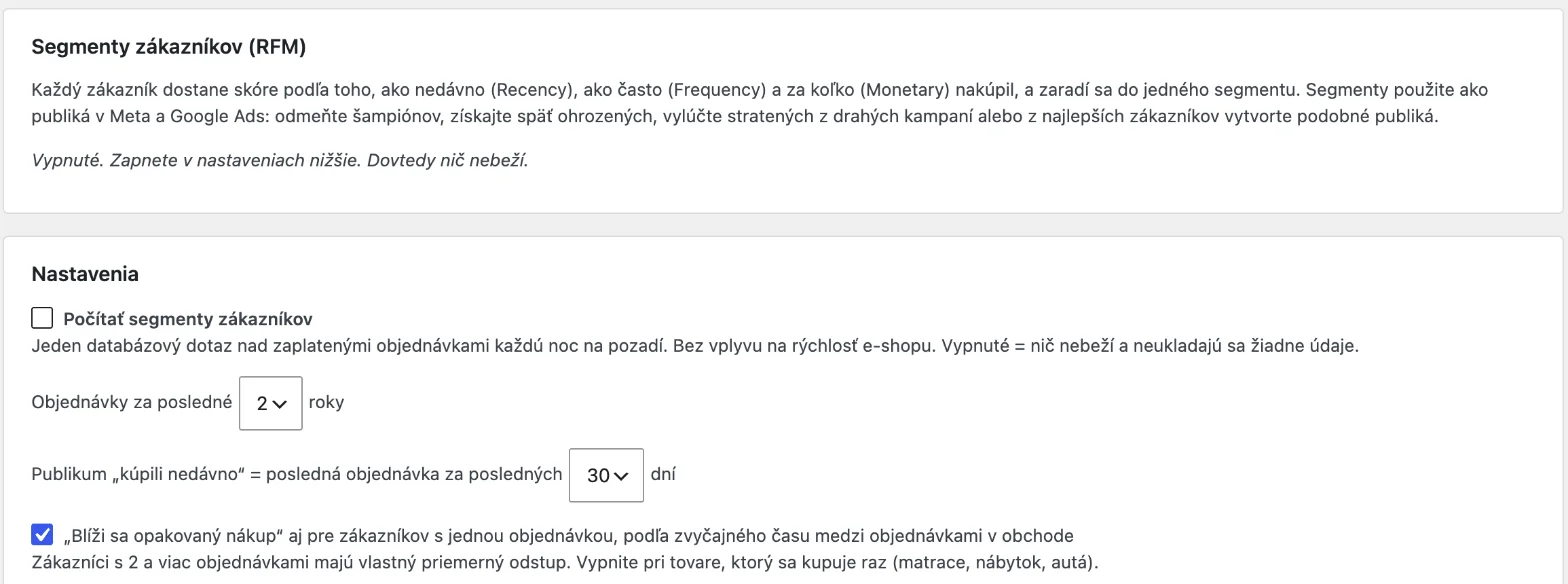
1. Turn on segments
In WordPress go to WooCommerce → Catalog feed → Customers (RFM) tab.
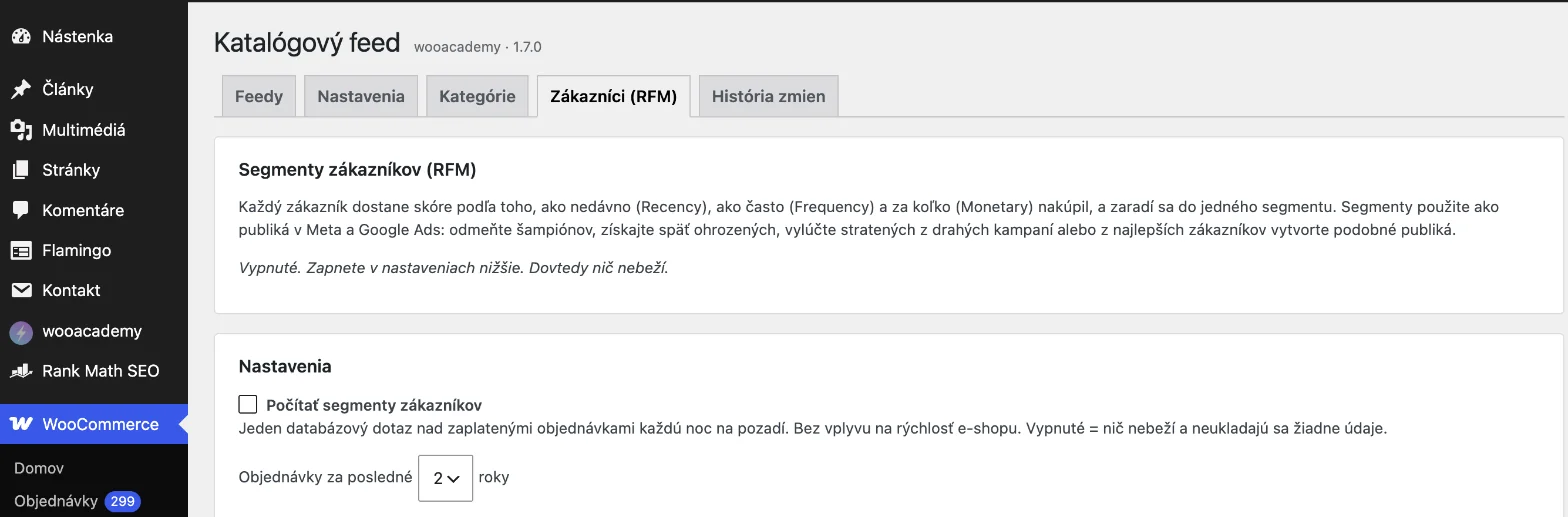
Tick Calculate customer segments and choose:
- Orders from the last 1, 2, 3 or 5 years. Two years suit most shops.
- Recent buyers – how many days after a purchase the customer stays excluded from prospecting. For products with a long decision cycle choose 60 or 90 days.
- Repurchase due also for one-order customers – keep it on for consumables, turn it off for products bought once.
2. Choose the legal basis
See the consent section above. The checkout checkbox is the safest choice; the downside is that audiences only start growing with new orders.
3. Connect Meta
Two options:
- Manual. Download the Meta CSV for a segment and upload it in Ads Manager → Audiences → Custom audience → Customer list. The file includes a value column for value-based lookalikes, but you have to re-upload it yourself.
- Automatic. In Business Manager create a system user, assign it the ad account with permission to manage campaigns and generate a token with ads_management. Enter the ad account ID (act_…) and the token in the plugin and tick the audiences to send.
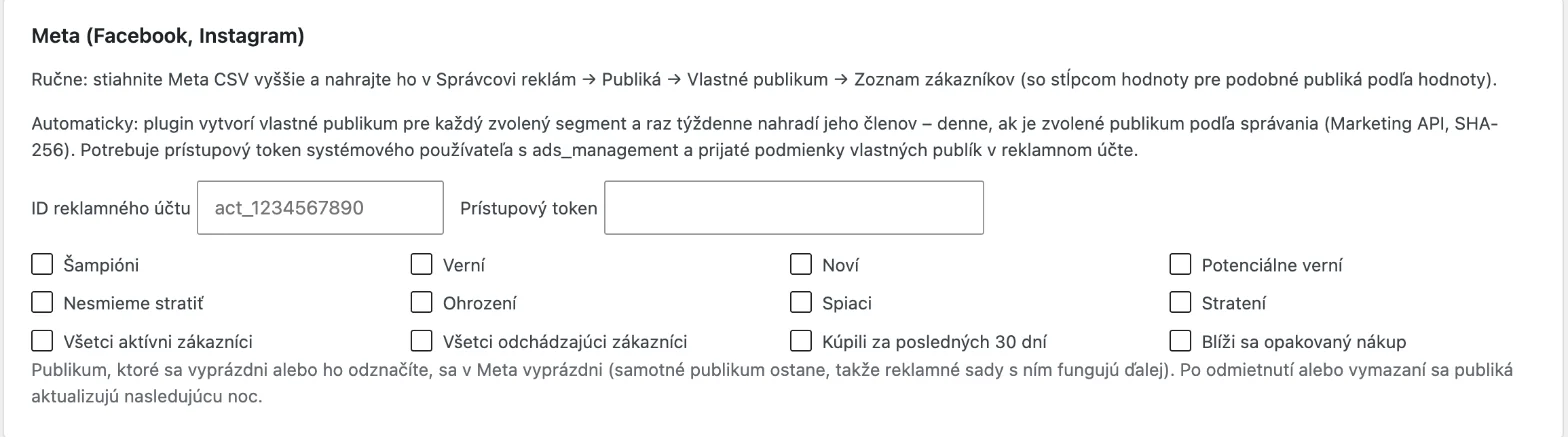
The plugin creates a custom audience named wooacademy RFM plus the segment name for each ticked audience and replaces its members once a week. If you pick a behavioural audience, it syncs daily, because those change every day. Technically these are standard custom audiences via the Marketing API.
Tip: combine Bought in the last 30 days with a website audience of Purchase events over 30 days. The pixel one reacts within minutes, the plugin one adds people the pixel missed. Exclude both from prospecting ad sets.
4. Connect Google Ads
- Manual. Download the Google CSV and upload it in Google Ads → Tools → Audience manager → Customer lists.
- Automatic. In Google Ads Data Manager add an HTTPS source, enter the segment URL from the plugin with the username and password, and schedule a daily or weekly import that replaces the whole list. The file is password-protected and served over HTTPS only.

5. Optional: GA4
The segment of a logged-in customer can go to the dataLayer as wa_customer_segment, only with analytics consent. In GTM, map it to a GA4 user property and build GA4 audiences from it, which are shared with Google Ads.

6. Check the result
The first calculation runs in the background within a few minutes of switching it on, then every night. The Calculate now link runs it manually. The tab shows how many customers are in each segment, how many can go into audiences, and the usual time between orders in your shop. Check in Meta a day later that audiences have a size and no error status.
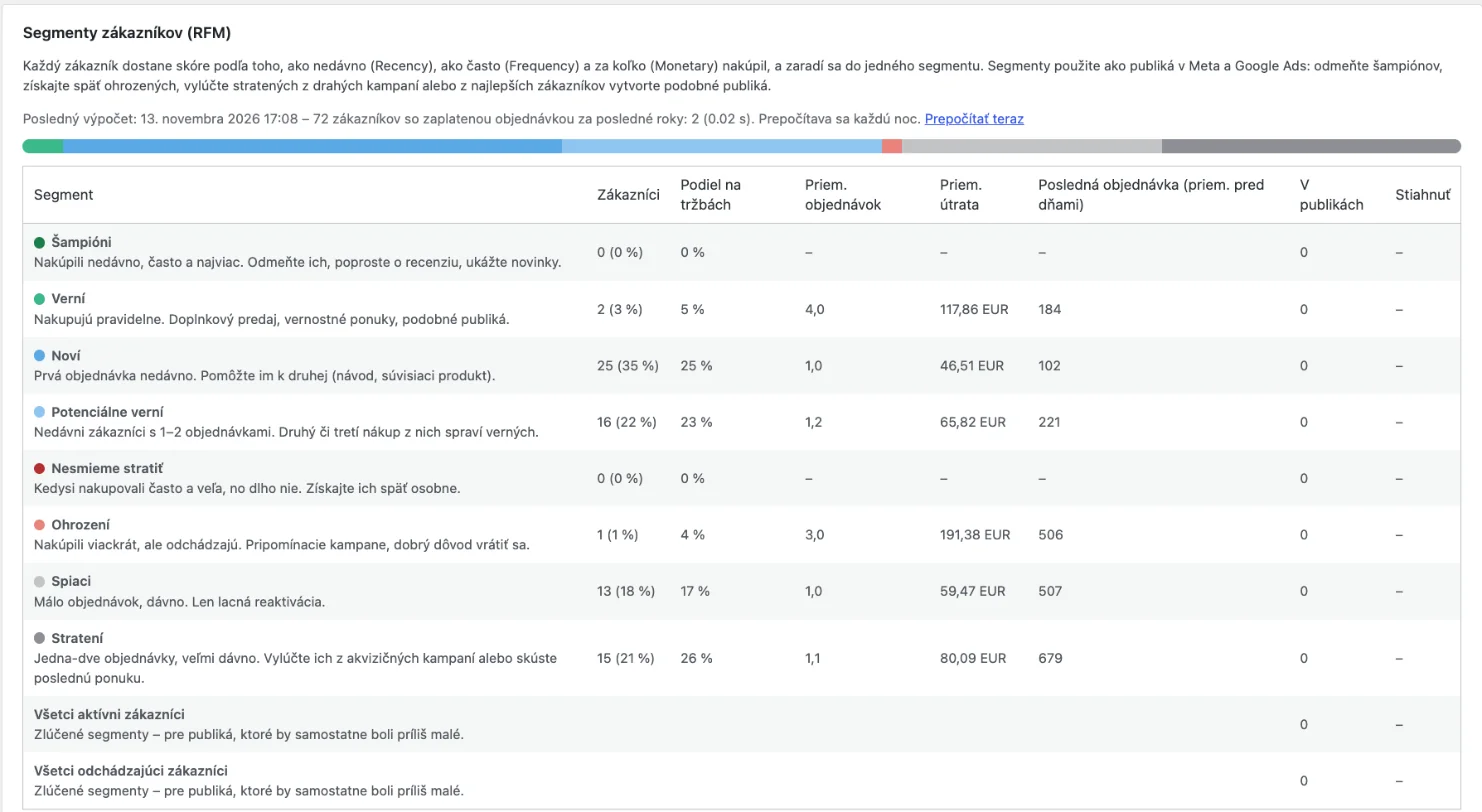
This is a typical picture of a smaller shop: most customers are new or promising, there are no champions yet, and lost plus hibernating customers make up almost 40%. Those are the ones worth excluding from expensive campaigns. There are 43 active customers in total, so not even the merged audience reaches Google’s 100-member minimum. A shop like this starts with buyer exclusion on Meta while it collects consents.
Three example setups
| Shop | Settings | Campaigns |
|---|---|---|
| Coffee roastery, repeat purchases | 2 years, recent buyers 14 days, repurchase for one-order customers on | Repurchase due with catalogue ads for their favourite coffee; buyers from the last 14 days excluded from prospecting |
| Mattresses and furniture, expensive one-off purchase | 3 years, recent buyers 90 days, repurchase for one-order customers off | All active customers excluded from prospecting; champions from the Meta CSV as a value-based lookalike seed |
| Cosmetics, mid-size shop | 2 years, recent buyers 30 days | New and promising with cross-sell; at risk with a win-back offer; lost excluded from expensive campaigns |
The numbers are suggested starting points, not results of specific clients. Adjust the windows to how long your customers take to decide.
Compared with the big platforms, and the price
Large marketing platforms can do the same. The difference is price, where the data lives, and what else comes with it.
| Solution | What it does with segments | Where the data is | Price |
|---|---|---|---|
| wooacademy catalog feed | RFM, recent buyers, repurchase due; Meta sync, Google file, GA4; plus product feeds | on your server, only hashes leave it | €99 / year (1 domain) |
| Bloomreach Engagement | full CDP, predictive segments, real-time sync, e-mail, SMS | Bloomreach cloud | custom; median per Vendr USD 160,700 / year |
| Klaviyo | segments synced to Meta and Google Ads, e-mail and SMS marketing | Klaviyo cloud | e-mail from USD 20 / month at 500 active profiles, rising with contacts |
| Metorik | WooCommerce analytics, segments, sync to Meta, Google, TikTok and more | Metorik cloud | from USD 25 / month, based on order volume |
| Manual CSV export | whatever you build in a spreadsheet | with you | free, but hours of work every month |
Prices checked on 13 Nov 2026 on vendor sites and in the Vendr database, excluding VAT.
When a big platform makes sense: you send hundreds of automated e-mails and SMS, want real-time website personalisation, or have tens of thousands of customers and a team to run it. When the plugin is enough: you run WooCommerce, advertise on Meta and Google, and mainly need to stop paying for existing customers and make better use of your best ones.
What you need and what it costs
- WordPress 6.2 or later, WooCommerce, working WP-Cron or Action Scheduler,
- for automatic Meta sync: Business Manager with a system user,
- for Google: an Ads account with Customer Match access,
- plugin licence €99 / year for 1 domain or €249 with done-for-you setup.
FAQ
Will it slow down the shop?
No. The calculation is one background database query at night. Nothing loads on the front end except the optional dataLayer variable for logged-in customers.
How many customers do I need?
Google uses lists from 100 members. Smaller shops should use the merged audiences or recent-buyer exclusion. It starts to pay off from a few hundred customers with consent.
Do I need wooacademy solutions?
No. You only need it if you want to use advertising cookie consent at checkout as the legal basis. The checkout checkbox works without it.
What happens when a customer withdraws consent?
They drop out of the audience selection at the next calculation and Meta removes them at the next sync. For Google it depends on whether your Data Manager import replaces the whole list. A manually uploaded list has to be uploaded again.
Does it work on Shopify or other platforms?
No, the plugin is for WordPress and WooCommerce only.