


What does a really good SEO article look like?
“An article on a website, as an SEO specialist sees it, is usually very different from a copywriter’s idea of a good SEO article,”
RNDr. Milan Fraňo, PhD. – SEO specialist
What is an SEO article? (a note for the pedants)
“SEO article” is of course an imprecise term, just like “SEO optimization” and “SEO online store”.
So what is an SEO article:
It’s an article optimized for search engines (because SEO means search engine optimization). In other words, an article that targets a particular keyword or group of keywords with the goal of ranking as high as possible for them in the search results (SERP). Ideally on page 1, in position 1 or position zero.
Personally, the term SEO article doesn’t bother me at all, just like the term SEO optimization doesn’t bother me. Of course I know these terms are imprecise, and translated literally they’d mean “search engine optimization optimization” and “search engine optimization article”.
1. Write unique content
Unique, original content doesn’t necessarily mean you have to propose, say or invent something completely new and original that nobody has ever said before.
It means your text won’t be an exact copy of other web articles, pages or online sources.
Google isn’t stupid. It can detect duplicate content very easily and reliably, and there’s no reason for it to rate a page with duplicate content positively. Duplicate content is a slightly more complicated topic, and I’ll cover it in a separate article (especially for the dozens of online stores with identical product feeds, texts and images).
Website users and Google are both happy when the content on a website matches their queries (keywords). The more unique content that answers the queries people search for, the more satisfied users you’ll have and the higher you’ll rank in Google.
2. Think carefully about the article title
The article title is important for SEO and helps both readers and Google understand what the article is about. In WordPress, the title of an article or page is automatically marked as H1. Every page should have only one H1 (with one-page websites it’s a bit different), and it should contain keywords that people search for and that relate to the content of the text.
Approach the article title very responsibly. If you don’t have keyword research and don’t know what people search for, you can, for example:
- watch your competitors and write about topics they write about (ideally choose competitors you know are doing SEO or that rank in top positions in Google for interesting keywords)
- use Google’s free tool, Keyword Planner. Even if you’re not running PPC campaigns in Google Ads, you can use it for free, and it’ll show you keyword search volumes and suggestions for related keywords. If you’ve never run paid ads, you’ll only see search volume ranges, which isn’t a big problem to start with.
- follow forums and Facebook groups and notice what bothers people most and what they discuss. For example, e-commerce groups often deal with shipping setup and payment gateways, so if I write a rich, comprehensive article on that topic, I definitely won’t miss the mark.
- your own head is a great source of keywords and topics to write about, but unfortunately we don’t always guess exactly how people search for a particular product or service
- the best solution (if you don’t have keyword research available) is to use paid professional tools to find out keyword search volumes. For a long time I relied on free tools or trial versions of paid services, but I found that if you’re serious about SEO, it pays to subscribe to one (the investment comes back to you in conversions from organic traffic). My favorite tool is Marketing Miner, and we can even give you a 40% discount on the first month with the code MM_WOOACADEMY.
3. Pay attention to the introduction
When indexing pages, Google’s robots try to understand as quickly as possible what a page is about (the context) and decide which keywords it will rank for, if any.
Your job is to help the robots figure out what the page is about through the right use of keywords, content, structure and so on.
The general recommendation for articles is to use the keyword or keywords in the first paragraph of the article (text). I definitely don’t recommend forcing keywords in unnaturally. It’s hard for me to set a universal rule defining the exact number and placement of keywords in the first parts of an article. The text has to read well and sound natural.
4. Keywords in the text
If you’re writing an article for SEO, you’re probably trying to cram a keyword into almost every sentence. That’s not really a good tactic; in the content itself I’d rather focus on breaking it up well.
The first step when I write an article is to write the heading (H1) and then 4 to 10 subheadings (H2) that split the text neatly and logically into smaller sections. Just like when you were writing your bachelor’s or master’s thesis.
H1 and H2 tags are very important for SEO and Google, and so is using keywords in those tags. They help Google better understand what the text is about. This very article is an example of splitting an article into H1 and H2.
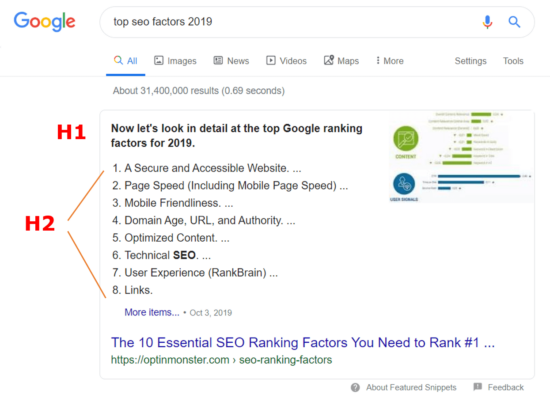
One more argument for using H2s: “When you ask how to get into the answer box in the SERP as a featured snippet, my answer is to notice which tags Google pulls into these quick answers.”
If you’ve just looked at an answer box in English, you probably noticed that Google places content from the H1 and H2 there, for example.
The second step is filling in the content itself:
- I don’t recommend mixing different languages
- fill each subheading (H2) with content that describes the topic or subtopic in detail
- a single standard page won’t help you much in SEO; the content should have 1,000 to 2,000 words. Yes, words, not characters.
- you should use bold text <strong> sensibly. Even though some SEO charlatans claim it’s a top SEO tactic, the reality is that although Google does recognize words in bold (strong), don’t expect any big miracle in your search rankings just from adding this tag. The strong tag is used to add semantic emphasis. More on this in another article, but in short, it should be used to mark a word that’s important for some reason. Matt Cutts commented on this topic in 2006 and 2013 (here’s a link to the video with Cutts) and didn’t give this factor much weight.
5. Internal linking is good for SEO
Always use links within your pages and articles.
- Internal links to your own domain, where you link to another article, service or product.
- External links, which point outside your domain; you can link the article to case studies, sources or quality content worth reading (outside your domain).
Google doesn’t want linking to look natural, it wants it to be natural. In practice, very few websites give a backlink to another domain on their own and for free.
If you have nowhere to point an internal link, I recommend creating a new page or article for the link to lead to.
Linking is good for both readers and Google. Not only do you help Google understand what the content and context of the article are, you can also keep the reader on your website and guide them toward converting.
The “holy grail” is a backlink to your website: a hyperlink that someone places on their domain pointing to your website or article. It’s one of the three top SEO factors (1. backlinks, 2. RankBrain and 3. content).
How many backlinks do you need for it to make a difference for SEO?
The good news is that when you look at the link profile of your competitors’ articles, you’ll probably be very surprised. You’ll find that even articles and pages in top positions in Google have somewhere between 0 and 1 backlink.
So if you get 1 or 2 backlinks to your article, you can very quickly take the top spots on the first page of the SERP for a particular keyword.
For more competitive keywords you may need 5 to 10 backlinks.
I won’t go into what an optimal link profile looks like right now, you’ll learn that in my SEO course in Bratislava. I’ll just mention that anchor text definitely matters in linking. Ideally, the link shouldn’t be placed on words like “click here / more info”, but on a keyword related to the content the link points to.
6. Make the text look good (UX factors and RankBrain)
I’ll write in detail about the RankBrain algorithm and its importance for SEO (it’s one of the top 3 SEO factors) in another article, or come to our SEO course, where I explain it in depth.
In short: “Google sees what people do on your website. It knows that if a visitor lands on a page and leaves straight away, they probably didn’t find what they were looking for. If that happens repeatedly, Google concludes that your content probably isn’t that relevant for the keyword and moves you lower in the search results (very simplified and in short).”
It’s a bit more complicated, but you need to realize that Google also knows when a user didn’t find the answer to their query on your page and went to the page below you (in the SERP), where they stayed longer because they found the answer. So it moves you down and the result below you up (pogo sticking).
What to do so the text looks better to users and they don’t leave my page?
- split the text into logical sections that read well (H1–H3 structure)
- write for people, not for Google; have someone impartial read the article and make sure it reads well and is easy to understand
- use white space, images, bullet points and anything else that helps make the text clearer
- don’t write one solid wall of text
- pay attention to the visual layout of the text too; for example, this article is set in a centered column rather than edge to edge, which makes it easier to read
- use an easy-to-read font, size and color
Tip: “Create an article template in WordPress and just copy it, changing the text and images.”
We’ll also show you how to lay out elements in WordPress at the workshop How to build a website without coding.

7. The author’s name matters (E-A-T)
It’s good to publish articles under an author’s name, whether real or a pseudonym.
It matters for the authority of both the article and the website. The acronym E-A-T stands for Expertise, Authoritativeness and Trustworthiness. It’s part of an algorithm aimed at content on Google that could affect a reader’s health or influence them in a major life decision. Its purpose was to stop, for example, nutrition advisers who barely finished primary school and have no idea about human health from writing about how vitamin C cures cancer and similar nonsense that’s far from the truth. As a scientist, I’m immensely grateful to Google for this algorithm update.
How to work with E-A-T in SEO articles?
Just a few quick recommendations (more in our courses and workshops):
- use sources that are relevant not only in terms of Domain Authority but also in terms of expertise
- publish articles under the author’s name and add a short bio, which builds the website’s expertise and authority (especially important for health and finance websites)
- make your contact details and privacy policy (GDPR) easy to find on your website
You’ll learn more about E-A-T and exactly how to work with it on your website in our courses and workshops in Bratislava.
8. Use images and optimize them
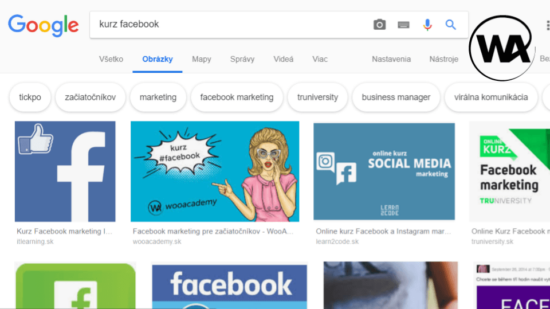
Image optimization for search engines is a regular part of SEO techniques, which fortunately many websites completely neglect, and that’s why we rank in top positions in image search for many relevant keywords.
Websites offering visually interesting services and products in particular shouldn’t underestimate image optimization. Clothing, plants, cars and many other products, for example, are searched for primarily through images.
You can read more about image SEO on Google in the article Google Images – Image SEO (the basics).
9. Proofread your article
If you’re one of those gifted people who can write an article on the first try without mistakes and with a clear concept, congratulations. For everyone else, I recommend reading your article several times and catching grammatical errors and unclear, hard-to-follow sentences.
If you publish an article that isn’t 100% right, you risk being picked apart in some groups, on Facebook for example, and buried in a shower of hate over some trifle.
It also lowers the credibility of your domain and brand.
10. Is your content better than your competitors’?
There’s not much point in writing the same articles your competitors have. Your content should be better: it should describe the topic much better, be easier to read and more comprehensive. If your competitor writes a 1,000-word article, you write 1,500 to 2,000 words.
Do your competitors have nice images? Make yours nicer or create a simple infographic, or record a video or podcast.
Simply put: “If you keep making excuses and pointing out that your competitors do the same and it works for them, I won’t be able to help you much with SEO. Because designing a well-thought-out SEO strategy and tactics is one thing, and putting it into practice is another.”
How long does it take to create a great SEO article?
A great SEO article sometimes takes 5 and sometimes 8 hours of work, including uploading and formatting it on the website.
Clients are often happy with a single standard page and feel they’ve got SEO sorted and will be in first place tomorrow for every keyword they can think of.
Why do they do it?
The simple answer: “Follow the money. One standard page (about 250 words) costs €15 to €35. A good SEO article has 1,500 to 2,000 words, so at €29 per standard page that’s €232 per article.”
Phewww, that’s way too much!!!
Really? If I tell you that with a good article you’ll be in the top positions on Google and sell your products or services because of it, is it still too much?
11. BONUS: Don’t forget about uploading the article and other SEO settings
What else do you need to do, and what shouldn’t you forget, when uploading and publishing an article in WordPress?
- set a featured image for the article (ideally 1200 × 630 px so it shares nicely on Facebook without being cropped)
- fill in the meta description (120 to 160 characters) and the title tag (50 to 60 characters), and don’t be afraid to use emoji, keywords and brackets. These aren’t direct SEO factors, but they increase CTR, and that is an SEO factor
- if it makes sense, add structured data for rich snippets. If you use the Rank Math SEO plugin, you can do it easily even without using Google Search Console, for example.